Guest
Try it, no card
Free
No sign-up fee, no card.
- About 20 messages a day on fast models
- No file uploads
Frontier AI, in orbit around your business
A template sets up your teams and their tools in an afternoon. From one screen you control spend, see how each team uses AI and keep company data safe. All for a fraction of what per-person AI subscriptions cost.
See it working
Short recordings from the product itself. Pick a team to see what it hands off and what comes back done.
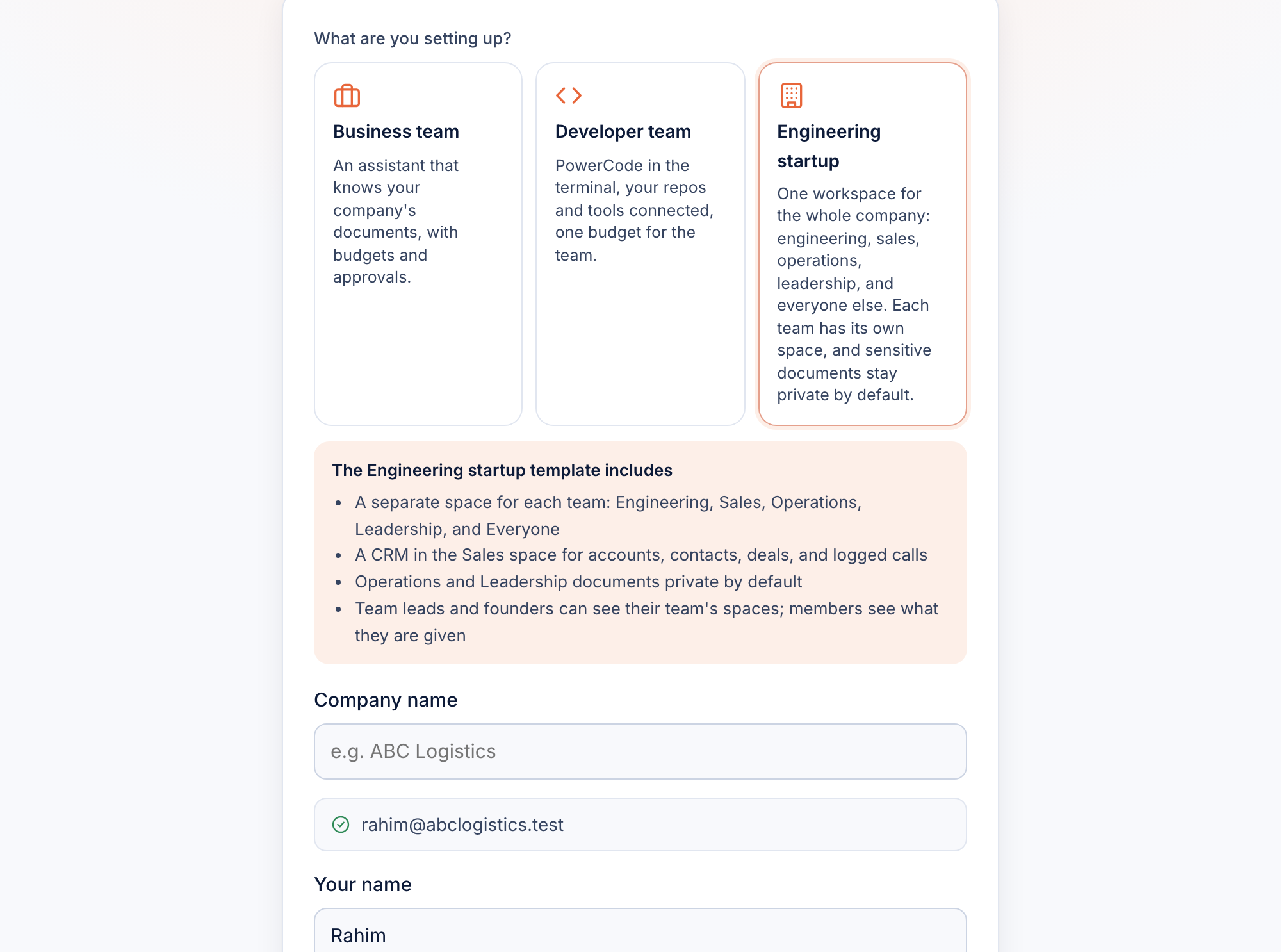
PreviewA template becomes a company. Pick a template and name the company. Team spaces, roles and first steps are ready in about a minute, with no setup project.
PreviewThe chat moves the deal. Say "move it to proposal" and the CRM beside the chat updates. Every change lands in the deal's history with an Undo, so reps spend minutes on admin, not hours.
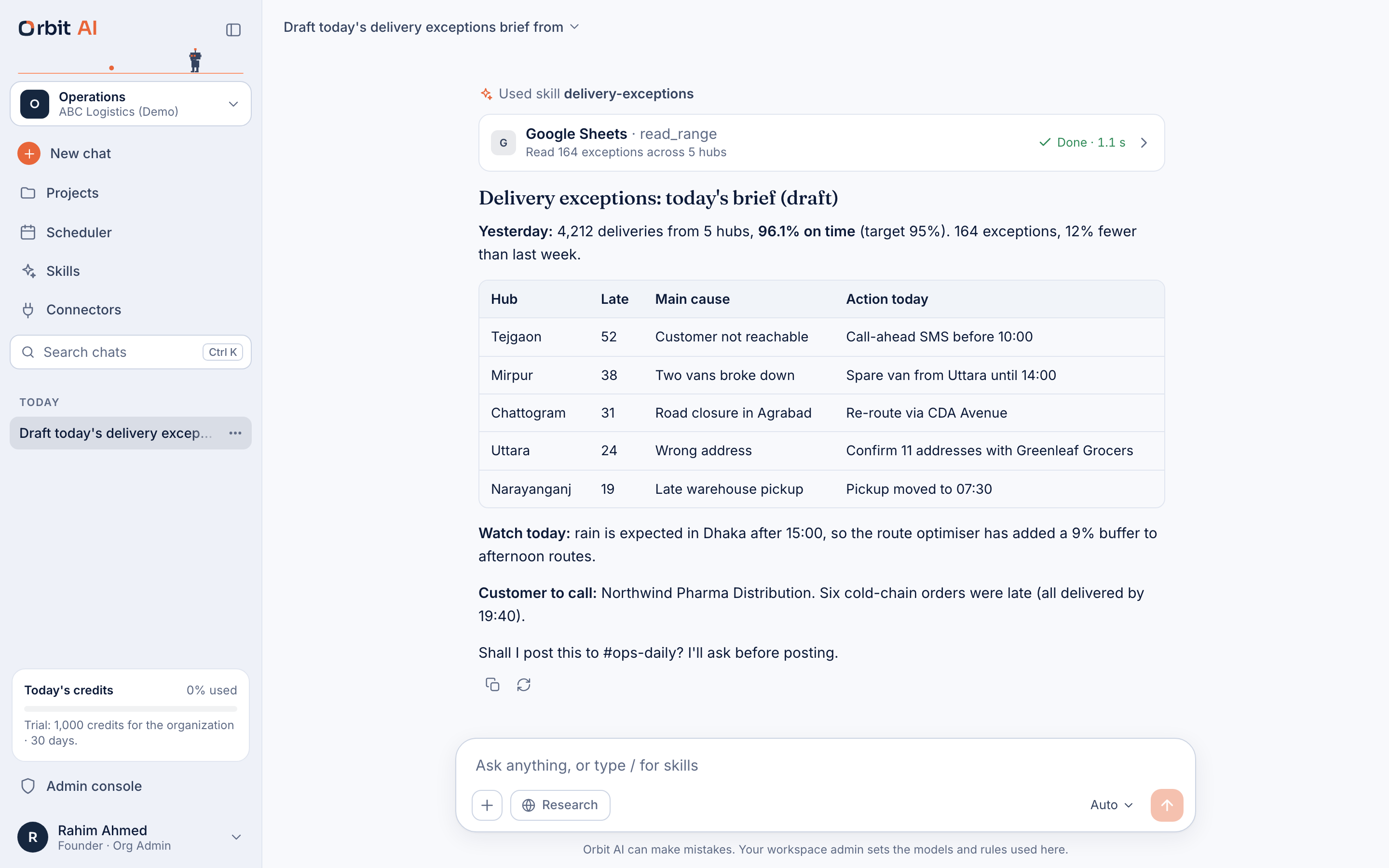
LiveThe exceptions brief, from a sheet. Orbit reads the shipments sheet with the team's own skill and writes today's brief by hub, with the cause and the action. It asks before it posts. A morning's work, done before the first coffee.
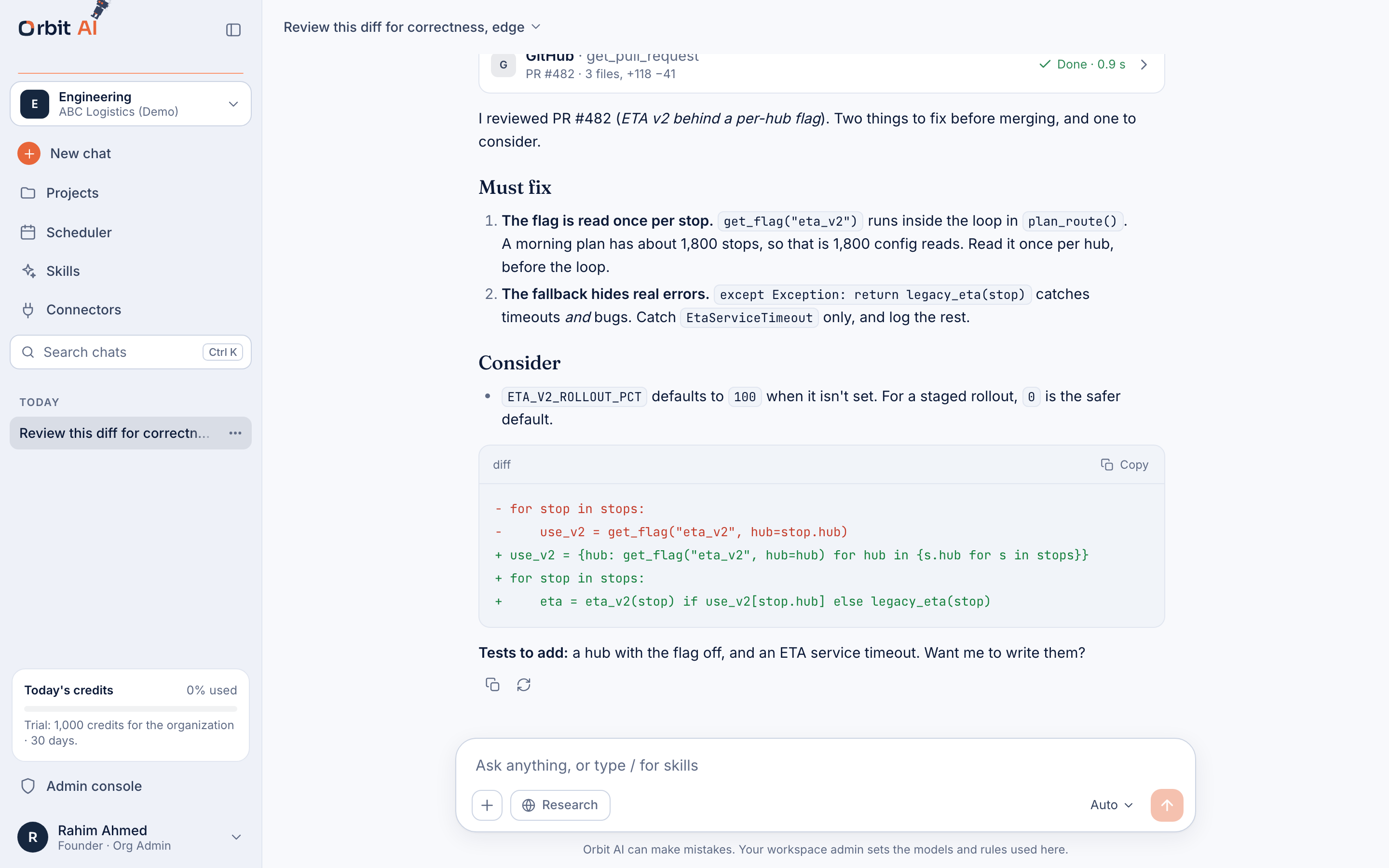
LiveA pull request reviewed before standup. The team's code-review skill reads the change from GitHub and returns what must be fixed, with a suggested diff. Seniors spend their time on the hard calls.
PreviewA Claude Code key for each engineer. The lead sees each person's coding use beside the rest of their AI use, and turns a key off in one click. Coding spend stays inside the team's budget.
Recorded in Orbit's demo build. ABC Logistics and Oleyn's people and deals are sample data, and replies are recorded examples. Live means in the product today; Preview means working in the demo, not live yet.
Pricing
You never pay for someone who didn't use it. Each person who used Orbit this month costs a small platform fee, and the AI they used is billed at the provider's price plus 20%.
Per active user a month. People who didn't use it that month cost nothing.
+15% above $5,000 a month of usage. Custom on Enterprise. Every model, one pooled budget.
Then $0.50 per GB a month. Exporting your data is always free.
Prepaid credits on every plan. Buy credits up front, turn on auto top-up if you like, and drop credits to teams or people.
Try it, no card
Free
No sign-up fee, no card.
Individuals and teams up to 5
$0
Platform fee. Prepay credits from $5.
For growing companies
$5
Per active user a month, plus AI used.
Everything in Team, plus
$12
Per active user a month, plus AI used.
Larger or regulated teams
Custom
Custom AI rates and terms.
Opening soonPrices are in US dollars. Paid billing opens soon, and you can start on Orbit today. Local currencies follow market by market, starting with taka in Bangladesh: ৳600 for Team and ৳1,450 for Business, per active user a month.
Why Orbit
Most companies pay for a handful of licences for their heaviest users. Everyone else uses free or personal accounts, with company data in them and no rules. 68% of employees use personal AI accounts for work, and 57% have entered confidential information (TELUS Digital, 2025).
Why the name. The best AI models, your team's tools and your company's rules all circle one centre: your business. Nothing drifts off into a personal account.
One workspace
One workspace replaces a stack of subscriptions: frontier models led by Claude, your files, your apps and your rules. Nobody has to set up an API key.
Pick the model that fits the job, with files, memory and sharing included.
Turn on Research for questions that need digging. The answer comes back with its sources.
Teams save how they like a job done. Orbit uses the right skill, like code review, when it fits.
Orbit works inside the tools you already use, like a spreadsheet, a shared drive or a pull request.
Run a brief or a check on a schedule, like the operations brief every weekday at 7am.
Each team has its own space, files and ready prompts, private to the team when it should be.
Orbit is not tied to one AI company. We lead with the Claude 5 family at the frontier, and models from other providers sit beside it, from frontier to low-cost, all under the same budgets, rules and bill.
LivePlus models from other providers: other frontier models for a second opinion, and low-cost open models for routine, high-volume work.
Heavy users win too. They get Opus and Fable when the work needs them. Anyone can switch to Haiku or a low-cost open model for routine work in one click, and budgets fall back to a cheaper model on their own Preview, so a heavy week never stops the team.
Templates
Start from a company that already works like yours. A template sets up team spaces, roles, starter projects, instructions for the assistant, budgets and guardrails. Change anything after.
Free
ConceptNot in the product yet.
Free base, premium pack
PreviewException briefs are in the demo. The tracker is a concept.
Premium
PreviewContract review is in the demo. The register is a concept.
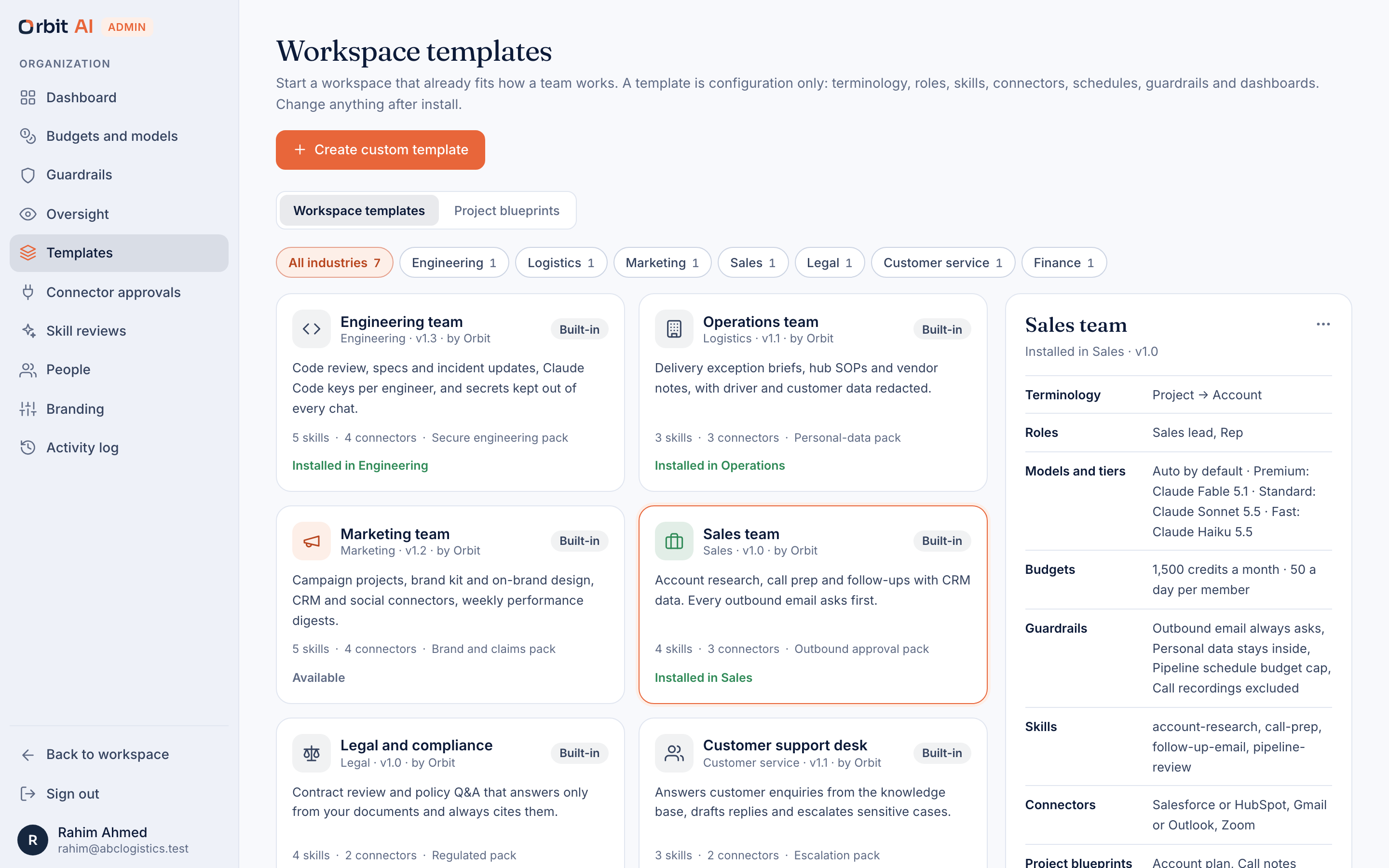
Bigger company? Connect your existing tools through connectors, or build your own in-house templates so every new office starts the same way. A template builder is coming. Coming
Marketplace Early access
We are opening it to early partners; it is not a live store yet. Each skill will be scanned with NVIDIA's open-source SkillSpector and reviewed by a person before it is listed.
Security
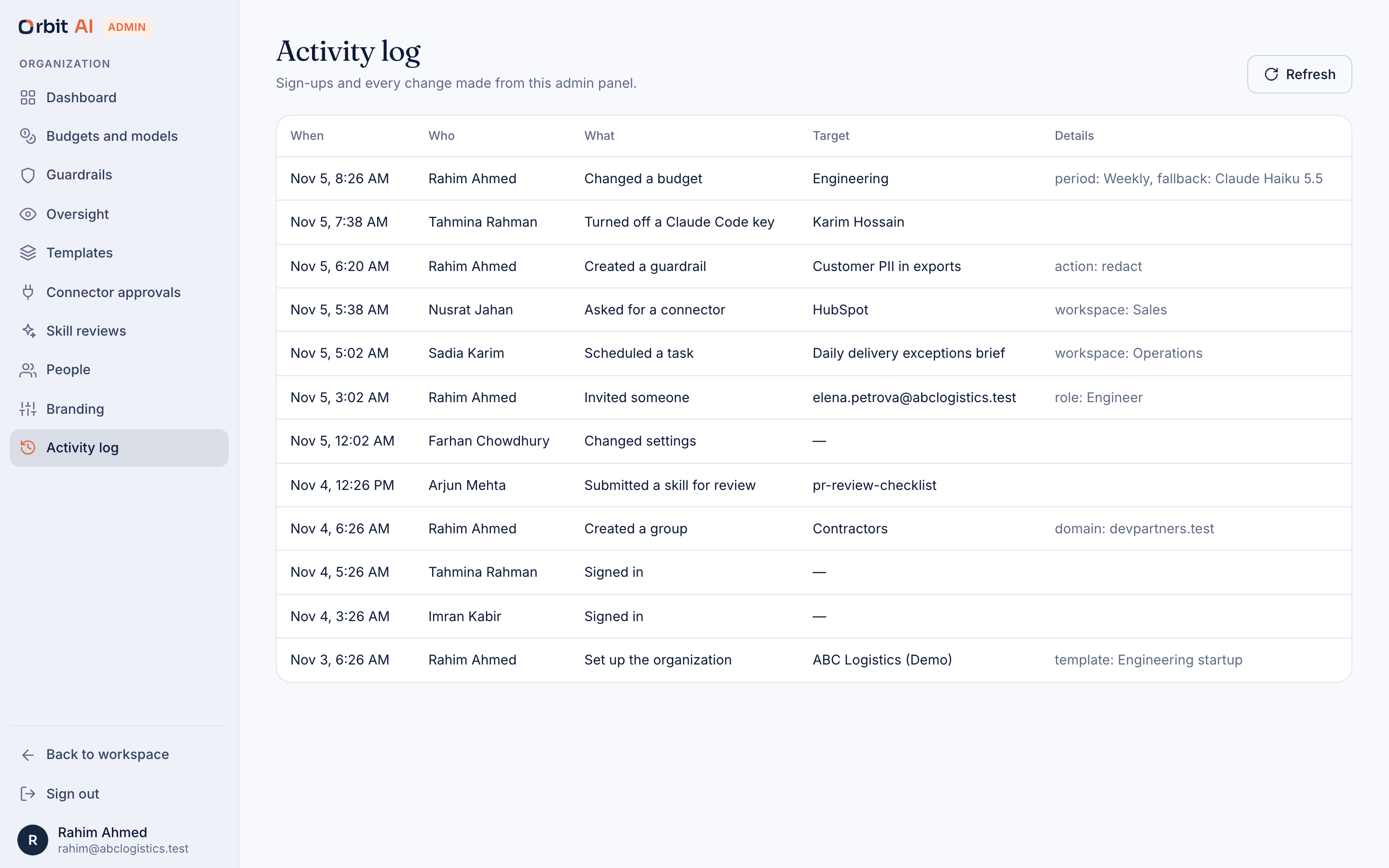
Every request passes through one control layer before it reaches a model. Your rules run there for every team, and admins see usage, never what anyone wrote.
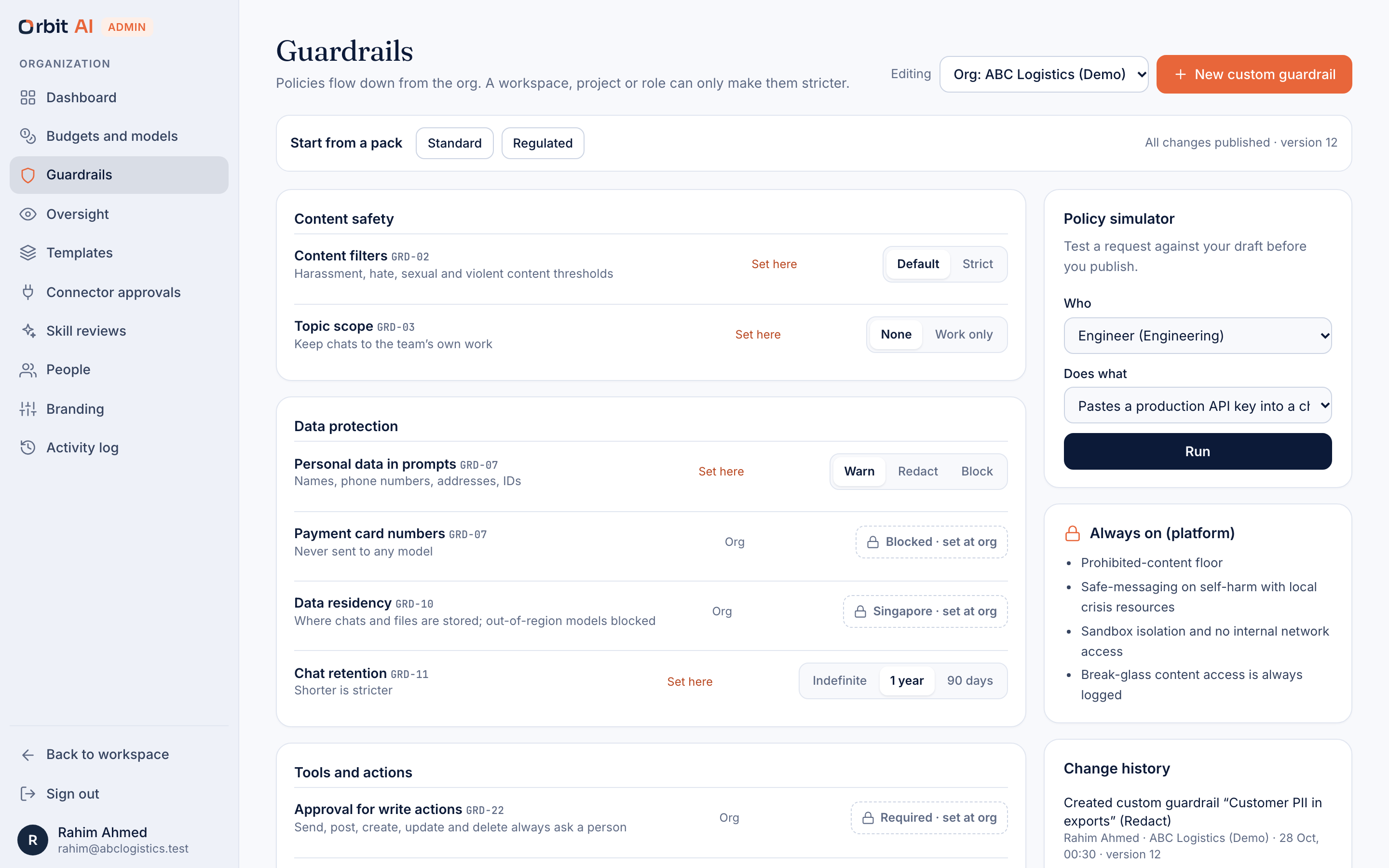
A pasted API key or customer phone number is logged, flagged, hidden or blocked before it reaches a model.
Admins see spend and adoption by team. What people write stays with them.
Each engineer gets a key with a budget, and the lead can turn one off.
Budget changes, keys, rules and connectors. Who did it, and when.
Outside skills are scanned with SkillSpector and reviewed by a person first.
Questions
Anything else, talk to sales.
Each request costs what the model provider charges for it, and we add 20%. Once your AI usage passes $5,000 a month the rate drops to 15%, and Enterprise gets custom terms. The markup covers payment and currency fees and pays for the fallback, caching and reporting that keep the total bill down.
With prepaid credits on every plan. You buy credits up front, and each request draws them down. Auto top-up is optional. Admins can drop credits to teams or people.
Anyone who used Orbit during the month. If someone didn't open it, they don't count toward the Team or Business fee that month.
We lead with the Claude 5 family: Claude Fable, Claude Opus, Claude Sonnet and Claude Haiku. Opus and Fable suit the hardest work, Sonnet everyday work, and Haiku quick, low-cost work. Orbit is not tied to one AI company, so models from other providers are there too, from other frontier models to low-cost open models, all under the same budgets, rules and bill. Admins choose which models each team can use. On Enterprise you can bring your own key or cloud credits.
You choose, per team or person: alert only, switch to a cheaper fallback model, or stop new work. For example, Engineering can move to Claude Haiku at 100% of its weekly budget and stop at 120%. Per-team budgets are in preview; usage limits per organization are live today.
No. Admins see usage: who is set up, how much each team spends, and which teams haven't started yet. Support access to an account is logged with a reason.
Prices are in US dollars, and local currencies are being added one market at a time, starting with taka: Team is ৳600 and Business ৳1,450 per active user a month in Bangladesh, payable with bKash, Nagad, card or bank transfer.
Live is in the product today: chat, research, projects, skills, connectors, scheduled tasks, team spaces, usage limits and data rules. Preview works in our demo build but is not live yet: templates, the CRM, developer keys, per-team budgets and the admin dashboard. Coming is not built yet. Concept and Early access mark ideas we are testing with partners. Illustrative marks modeled numbers. Data export is always free.
Start your organization today, or talk to us about a rollout for every team.